
Work orders without paper and without retyping.
Solution 05 · Production moduleThe order sits on the screen at the line, with the right settings alongside it. What the operator registers lands in your system straight away.
Register once, at the line.
- A work order travels from desk to folder to Excel.
- In the evening somebody types it all in again.
- Settings and recipes live in one person's head.
- The operator sees their order, settings and counts on the screen.
- Registration happens at the line, once, while the work is being done.
- Your report is ready at the end of the shift.
This is how it looks in the AIONIX portal.
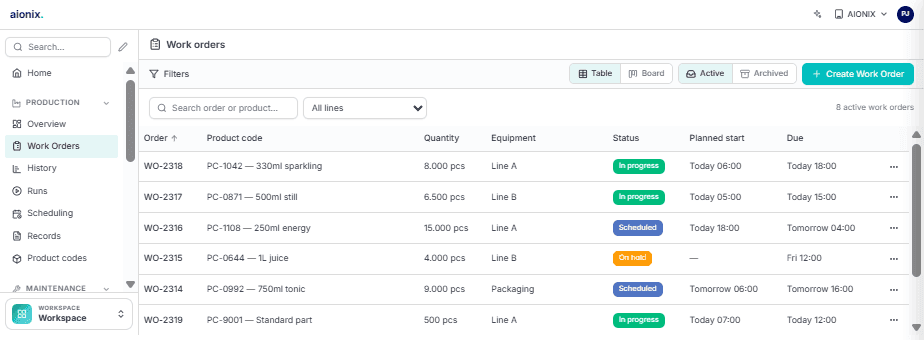
Pull in, execute, report back.
Pull in
Orders arrive automatically from your ERP at the right machine, with settings and quantities.
Execute
The operator starts, registers and signs off on the screen. Paper is no longer needed.
Report back
Parts made, hours and scrap go back to your ERP. Nobody retypes anything.
The states a work order moves through.
A digital work order is not a sheet on a screen. It is an order with a state, and that state is what keeps the floor and the office looking at the same thing.
- 1
Received
The production order arrives from the ERP. What has to be made and how many, with no machine or moment yet.
- 2
Scheduled
The order gets a line and a place in the sequence. From here the floor knows what is coming.
- 3
Started
The operator starts the order on the screen at the line. Time recording runs from that moment, not from filling in a sheet afterwards.
- 4
Interrupted
Downtime, a changeover, or another order taking priority. With a reason attached, because an interruption without one is a hole in your figures.
- 5
Reported complete
Good count, reject count, and the time it actually took.
- 6
Reported back to the ERP
The quantities go back to the order in the ERP. Nobody retypes anything.
Work that is not on an order, helping out or a repair, is registered as indirect time with a reason. Hide it inside the order and that order looks more expensive than it was.
The same work order, four different screens.
Sees the order on screen
What, how many and on which machine. Reporting it complete happens in the same place.
Divides the work
Which order sits where, and what has not started yet. Without walking the lines.
Follows the status live
No more round of asking how far along something is. The progress is on the screen.
Retypes nothing
The quantities the floor registers go back to the ERP instead of via a sheet.
Five questions about digital work orders.
Does the work order come from our ERP?
What if there is no screen at the machine?
Can an operator deviate from the order?
What about work that is not on an order?
Does the paper disappear completely?
What digital work orders gain from the rest.
Work orders are where the floor enters data. Because that happens on the MOM platform's data layer, the same entry is immediately useful to the other modules.
Production monitoring
A closed work order tells you the job is done. Add production and you also see how it went: pace, stops, and where the time disappeared.
Quality
The check belongs on the work order, not on a second sheet. Together the operator registers once and the measurement is already attached to the right order.
Traceability
What gets registered here is exactly what you need three years later. Entered digitally means findable, instead of archive work.
To see work orders carry the right settings automatically, read how Depro Profiles manages its recipes centrally. Why execution does not belong in your ERP is covered in ERP vs. MES.
Put your entire shop floor on the same platform.
No 'big bang'. As a West Flanders-based team, we start at your SME with the first module on the first line, prove the value, and build out together to your full platform, at the pace and budget of an SME.